Google Chrome
UPDATE:
It has NOT been possible to install the plug-in on Google Chrome since September. We advise you to use internet exlprorer (not edge) web browser!
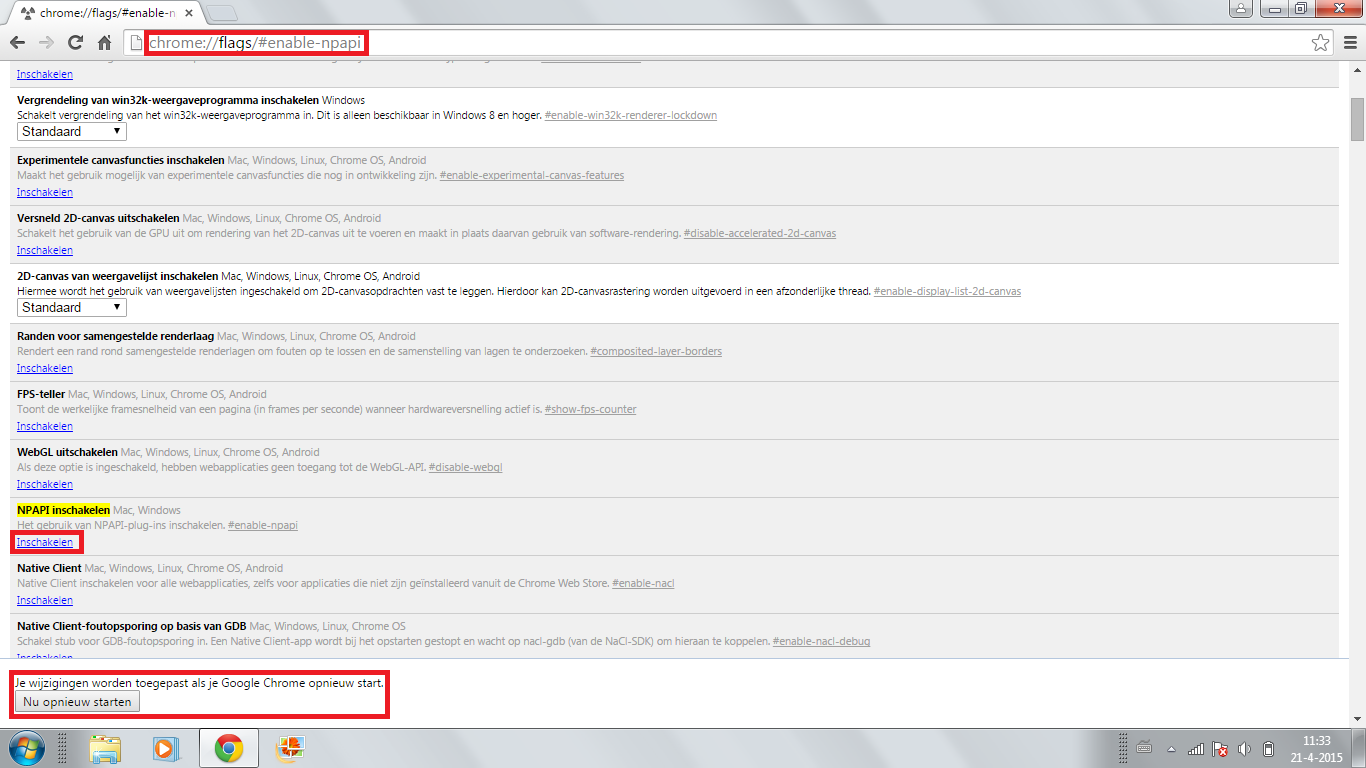
Due to a Windows update, since April 19 it is no longer possible to activate the plug-in for your HikVision camera system on google Chrome. Please follow the steps below to solve this problem:
Step 1: Open google Chrome
Step 2: Type chrome://flags/#enable-npapi
Step 3: Click Enable under 'Enable NPAPI'
Step 4: Click Restart now at the bottom of the screen
Once you are logged in, you may need to accept the plug-in again. You can do this at the top right of the screen by clicking on the Puzzle piece with a red cross and Allow.
Now everything should work again.